01
May

Using ActiveModel::Name to simplify URL generation

Most Rails developers are familiar with generating RESTful URLs polymorphically by simply passing an object to one of many helper methods that expects a URL, such as link_to and form_for:

# In Routes
resources :articles

# In View:
form_for @article do |f|

This capability extends beyond just single objects, supporting nested routes and specific action targeting; for example:

# In Routes:
namespace :admin do
  resources :categories do
    resources :articles
  end
end

# In View
form_for [:admin, @category, @article] do |f|

Problem

One problem I’ve run into with some frequency, however, is using this polymorphic path approach when the class name of the ActiveRecord model does not quite correspond directly with the resource name. This occurs most frequently when you want a little more context in your model naming which may not be necessary in routes. For example, lets look a domain model with customers having many customer locations:

# Models:
class Customer < ActiveRecord::Base
  has_many :locations, :class_name => "CustomerLocation"
end

class CustomerLocation < ActiveRecord::Base
  belongs_to :customer
end

# Routes:
resources :customers do
  resources :locations
end

In the above example, the model name is "CustomerLocation", but the resource name as specified in the routes is just "locations", since the context of customers is already well-established from the nesting. The problem with this is when we try to use our regular polymorphic path solution:

form_for [@customer, @location]
# Tries to generate: customer_customer_location_path(@customer, @location)

Many people when running into this will just do away with using the clean polymorphic path solution entirely and instead provide the URL explicitly:

form_for @location, :url => customer_location_path(@customer, @location)

This of course works but isn't exactly ideal.

Solution

While it might look like it's using the class name to construct the url helper method name, it's in fact using "model_name" instead (which defaults to the class name). But, this can be overridden!

class CustomerLocation < ActiveRecord::Base
  def self.model_name
    ActiveModel::Name.new("Location")
  end
end

After this, the polymorphic path [@customer, @location] works as we would expect.

Another common situation where this technique becomes useful is if you are working extensively with namespaced models. This is tricky because the namespace ends up becoming part of the model name, which almost surely does not map to your resource hierarchy:

# Model:
class Core::Customer < Core::Base
end

# View:
form_for @customer
# Tries to generate: core_customer_path(@customer)

Overriding model_name will allow you to explicitly define "Customer" as the model name, despite it being namespaced within "Core". But we can do better than that - if you have a base model for your namespace (as I believe is always a good practice), just put this in the base model:

class Core::Base < ActiveRecord::Base
  def self.model_name
    ActiveModel::Name.new(name.split("::").last)
  end
end

Although this technique has served me well in many apps, do be aware that the model name is used in some other instances throughout Rails such as error_messages_for, so do use this with care.

Though all of the above examples are for ActiveModel/ActiveRecord 3.0 or higher, the same technique will work in Rails 2.3 by simply using "ActiveSupport::ModelName" in place of "ActiveModel::Name".

01
Jan

Why you should always validate maximum lengths in models, and how to do so easily

Developers seem to rarely use validates_lengths_of with their models, despite there being an inherent maximum length on every string and text field – the one enforced by the database. Since table migrations in Rails set a fairly high maximum length for string attributes, most people don’t think twice about the possibly of that limit being exhausted. Even beyond this, there may be other reasons why the field limit is set fairly low, or perhaps you’re working with a legacy database.

Without validating maximum field lengths at the model level, ActiveRecord will still ship off the full field value as entered in an INSERT query. From there two things might happen, and this depends on the database itself.
1. It might fail the query with an ActiveRecord::StatementInvalid exception. Since this is an exception most developers don’t routinely handle, this could cause the entire request to fail. This occurs with SQL Server for sure, and possibly other databases.
2. It might accept the query and simply truncate the result to the field limit. This might sound better than #1, but IMO it’s actually worse: now you have an instance where the everything appeared to go along fine, but you might end up with missing data. This is the default behavior with MySQL.

There’s another reason why you should always validate field lengths, and that’s to limit the possibilities for a Denial of Service attack. If an attacker knows you aren’t validating field length and that whatever they’re providing is going straight into an SQL query and being sent to the database, they can craft extremely large requests that might fill up the pipe to the database. Even if the data doesn’t actually end up being inserted in full, they’ve tied up a database connection and – since the regular old “mysql” gem will block for the query result – a Rails process.

Unfortunately in order to do this properly you essentially have to write validates_length_of lines (or the equivalent ActiveRecord 3 form) for each attribute, with it’s maximum database length. To make this easy, I wrote a gem called validates_lengths_from_database that will introspect your database string field maximum lengths and automatically defines length validations for you.

To install, just include the gem in your Gemfile (works with Rails 2.3 and Rails 3.0):

gem "validates_lengths_from_database"

Then in your model you can activate validations:

  class Post < ActiveRecord::Base
    validates_lengths_from_database
  end

It also supports filter-style :only and :except options:

  class Post < ActiveRecord::Base
    validates_lengths_from_database :only => [:title, :contents]
  end

  class Post < ActiveRecord::Base
    validates_lengths_from_database :except => [:other_field]
  end

Note that this cannot be done at a global level directly against ActiveRecord::Base, since the validates_length_from_database method requires the class to have a table name (with the ability to load the schema).

For more information or to view the source, check out the project on GitHub: validates_lengths_from_database

02
Sep

Farewell Rochester, Hello San Diego

Six years ago I moved to Rochester, a city that at the time I had only vague recognition of, to start my life as a college student at RIT.  In those past six years I’ve gotten to know and grown to like the city I began my “adult life” in, despite the horrid winters.  Having grown personally a great deal in Rochester over the past six years, I’ve come to consider Rochester my “home” (over my parents’ home in Williamsport, PA).  After college, I decided to continue working independently based out of Rochester to do freelancing full-time.  Since then I’ve had the opportunity to meet and work with many great people, especially at Coworking Rochester, who have greatly enriched my daily life.
But, the past nine months have had me itching for a change.  Many of my college friends have moved on, and somehow there seems like there’s less for me in Rochester than there was when I was a college student.  The winters are also a depressing time of year when I feel like I’m only able to live half of my life.  I have visited many cities in the US and gotten to experience what life in another city might be like.  Most of all, I really just feel like taking a chance on something new – a new adventure.
So, after several trips there and much deliberation, I have decided to move to San Diego in November.  There are several reasons why I chose San Diego:
  • San Diego is a “big city”.  I’ve always longed to live in a larger city where more opportunities of all kinds await.
  • San Diego weather is outstanding.  Being able to play tennis every single day is a major plus.
  • San Diego has a lot of charm, particularly in the many communities outside of downtown such as North Park and Hillcrest.
  • My parents are moving (for half of the year) to Palm Springs, a city only a couple hours away.
  • Although paling in size to San Francisco, San Diego seems to have a decent tech community (and Ruby community).
  • The entire area seems far more laid back, and people are friendlier.
  • I do actually know a few people out there, which is more than I can see for most west coast cities.
I am in the process of shedding almost all of my personal belongings.  Before I leave, my property will consist of my keyboard (piano), some clothes, and my laptop.  On November 5th I will begin the drive out to San Diego, stopping in RubyConf in New Orleans along the way.
In conjunction with this move I’ll also be doing quite a bit of traveling between now and November 5th when I begin the drive out.  For part of September I’ll be taking advantage of the JetBlue All You Can Jet pass to visit Chicago, Boston, Washington DC, Seattle, Portland, San Francisco, Los Angeles, San Diego, and Phoenix, not mainly to tour but to just be in a different city each day and take in the vibe.  During this trip I’ll be working more or less like normal.  After that, and since my apartment lease ends September 30th, I’ll be spending the month of October “homeless” on an around-the-world trip patched together with cheap flights and hostel stays.  On this trip I’ll be starting in San Diego to look for apartments, then flying around the world westward to Vancouver, Hong Kong, Singapore, Bangkok, Dubai, Abu Dhabi, Istanbul, Athens, Barcelona, and finally New York.  I’ve scheduled a few days in each city and will be trying to see as much as possible.  I’m absolutely stoked about these two trips since I have such a huge passion for travel.  I doubt the low-cost opportunities that have made these trips so extremely cheap and affordable by me will ever come about again.
During these two trips I’ll be blogging along the way and maintaining a travel journal at Everlater:
During the next 2 months I will be flying 54,000 miles – over twice the circumference of Earth – and driving over 3,000 miles on what is by far the biggest adventure I’ve ever been on.  This exciting trip will be a great “reset” before I start to rebuild my life in a new city.  Despite this, the move will also be stressful and challenging for many weeks as I get settled into San Diego and start to meet new people, something I don’t always have an easy time doing.  Though challenging, I think it will be worth it in the long run.
To all of my friends in Rochester: you will be missed.  Thank you for the great past several years.  I’ll be back from time to time, and if you’re ever out in the San Diego area – do let me know!
07
Jan

Take Control of your Field Values with nilify_blanks

If in your data schema most or all of your fields are NULLable (the Rails default in migrations), you may have run into the issue whereby sometimes your fields are blank and sometimes they are NULL, two distinct representations of a “no data” state.  This arises in Rails often because when you submit a form and the user doesn’t fill in a value, the value sent to the database is an empty string, even if you may prefer the field to just remain NULL.

Enter nilify_blanks, my solution to handling this problem generically in your models.  With nilify_blanks you can specify the fields you want “nilified” (or default to all content fields) upon save if the field is blank.  This allows you to regain some consistency in how you represent data in the database.   Use of the plugin is best-explained with some examples:

Basic Examples

  # Checks and converts all fields in the model
  class Post < ActiveRecord::Base
    nilify_blanks
  end

  # Checks and converts only the title and author fields
  class Post < ActiveRecord::Base
    nilify_blanks :only => [:author, :title]
  end

  # Checks and converts all fields except for title and author
  class Post < ActiveRecord::Base
    nilify_blanks :except => [:author, :title]
  end

Specifying a Callback
Checking uses an ActiveRecord before_save filter by default, but you can specify a different filter with the :before option. Any filter will work – just first remove the “before_” prefix from the name.

  class Post < ActiveRecord::Base
    nilify_blanks :before => :create
  end

  class Post < ActiveRecord::Before
    nilify_blanks :before => :validation_on_update
  end
03
Jan

The Economics of Supporting IE6

I recently had a frustrating discussion with a developer friend of mine concerning building web applications to support Internet Explorer 6 that highlighted a recurring theme of technology people misunderstanding business and economic decision-making.  In it I found myself trying to defend a deliberate decision in an application I develop not to support IE6.  His take was that because so many internet users still use IE6, there’s just no reason why we should not build our applications to support the browser.

Now there’s no doubt that Internet Explorer 6 continues to have large penetration in the browser market.  But this fact alone resulting in a categorical dismissal of the deliberately not supporting IE6 misses some key pieces of economic reasoning that must be considered.

Before outlining the reasoning, let’s just accept the false assumption that browser usage numbers alone should dictate your decision regarding browser support.  If this is the case, what’s the breaking point?  At what percentage use do you decide not to support – what’s the magic number?  Making decisions this way is rather naive – any choice here is mostly arbitrary and bears to relevance to the trade-off of costs and benefits or the other considerations I outline in the rest of this post.  The core objective here is to balance the benefit of having more users access to your applications (or more correctly, the marginal revenue derived from the additional customers using only IE6, since it isn’t safe to assume that browser and revenue-per-customer are uncorrelated) against the anticipated cost of making your application IE6-compatible. As such, the relevant decision should carefully consider this trade off.  To help make this decision, there are considerations on both the cost and the benefit side:

Considerations on the Benefit Side

One thing that’s commonly done is to cite browser numbers as of today as if that’s the complete picture.  As a case in point look at Google Chrome: numbers for this browser are quite low but many developers are rushing to provide support for it because of the future expectation of higher numbers.   Basing your decision on current penetration numbers at a particular point in time would be like performing stock valuation with last fiscal years profit only.  Many companies that aren’t even profitable are worth magnitudes larger than established revenue-sustaining firms.  Therefore, when considering browser penetration, we really should be thinking not only about today’s numbers but also about anticipated numbers in the future, since presumably the application in development will last at least a year or two.  Put simply, trends matter.Another important point to consider is your target audience.

It doesn’t come as a surprise that browser choice does has some correlation with technical ability, so if your application targets hip, young internet users well-versed in other web 2.0 applications, you can bet that the percentage of that group using IE6 is significantly less than the percentage of older folks who barely check their e-mail and use an older machine.

Yet another important consideration, particularly if you are working on an internal project, is what degree of control you have over your users’ web browser.  For example, if you are working on an internal application used within your company, and the corporate standard is to use Firefox, then you aren’t going ot have much of a problem with IE6.   Even some applications, especially at first, are introduced to a smaller set of users with whom you may actually speak to in person and be able to influence the browser used with the application.  This is the case in one of the applications I work on and hence we haven’t found it worth it to support IE6 yet.

Considerations on the Cost Side

Implementing support for IE6 is not free.  Every web developer on Earth has a profound hate for Internet Explorer 6 with all it’s quirks, bugs, and non-compliance with established standards.  Creating semantic HTML/CSS markup that works well in IE6 is hard enough, but writing working JavaScript is five times more difficult to create and twenty times more difficult to debug.  Even when it’s working, often times you’ll have implemented hacks and other code smell that detracts from quality of the codebase.  Doing all this of course costs money since ultimately you are paying developers to produce the code and debug it for IE6.  In many cases this can be a significant additional expense.

Most importantly, the magnitude of this additional expense is extremely dependent on the specifics of the application.  A basic brochure ware website with no JavaScript would cost significantly less to support than a rich, web 2.0 application with significant interactivity.

Although it’s very difficult to quantify this cost (at least, more difficult than quantifying labor cost), there’s also something to be said for reducing code quality and structure for the sake of supporting IE6.  Extra DIVs, CSS hacks, less straightforward CSS due to lack of newer CSS selectors, and conditional statements in JavaScript all have a “cost” in a most abstract sense to the elegance of your codebase and may have additional maintenance costs in the future as you try to maintain a less clean codebase.

Another misunderstanding in general when thinking about costs and decision-making at the margin is that saving $1,000 in developer pay may not be the “real” economic cost here since keeping $1,000 cash may not be (and most certainly is not) your next best alternative, a concent economists call “opportunity cost”, which is the real cost that you should consider when making decisions.   Now in a more traditional setting your opportunity cost isn’t much higher than your cash expenditure so substituting cash isn’t a bad approach, but in a face-paced startup that’s growing very quickly, often times your opportunity cost can be enormous as new features and development have tremendous value.  Saving $1,000 in labor can be substantial if that $1,000 in capital could otherwise be used towards implementing new features that you  value at much, much more than $1,000.

The point here is not whether or not it makes sense for my particular application to support IE6.  Certainly it makes sense for many sites, usually content sites and those sites not targetted to a younger crowd, to support IE6 in full.  My point here is that decisions like these should not be shallowly-reasoned or be subject to categorical dismissals.  In decisions like this, it pays to approach a decision analytically like an economist would – think carefully about the costs and benefits.  And choosing which browsers your application supports is pretty trivial compared to all the other kinds of decisions in developing software that would benefit greatly from an application of economic reasoning.

30
Dec

ActiveRecord Drafts with has_draft

I ran into a problem a while back of creating draft copies of ActiveRecord models for the purpose of establishing a draft/live system. I’ve since found a reason to resurrect this and publish it to GitHub and clean some things up. Check out has_draft on GitHub.

has_draft allows for multiple “drafts” of a model which can be useful when developing:

  • Draft/Live Version of Pages, for examples
  • A workflow system whereby a live copy may need to be active while a draft copy is awaiting approval.

The semantics of this as well as most of the inspiration comes from version_fu, an excellent plugin for a similar purpose of maintaining several “versions” of a model.

This was built to be able to be tacked on to existing models, so the data schema doesn’t need to change at all for the model this is applied to. As such, drafts are actually stored in a nearly-identical table and there is a has_one relationship to this. This separation allows the base model to really be treated just as before without having to apply conditions in queries to make sure you are really getting the “live” (non-draft) copy: Page.all will still only return the non-draft pages. This separate table is backed by a model created on the fly as a constant on the original model class. For example if a Page has_draft, a Page::Draft class will exist as the model for the page_drafts table.

Basic Example::

## First Migration (If Creating base model and drafts at the same time):
class InitialSchema < ActiveRecord::Migration

  [:articles, :article_drafts].each do |table_name|
    create_table table_name, :force => true do |t|
      t.references :article if table_name == :article_drafts

      t.string :title
      t.text :summary
      t.text :body
      t.date :post_date
    end
  end
end

## Model Class
class Article < ActiveRecord::Base
  has_draft
end

## Exposed Class Methods & Scopes:
Article.draft_class
=> Article::Draft
Article.with_draft.all
=> (Articles that have an associated draft)
Article.without_draft.all
=> (Articles with no associated draft)

## Usage Examples:
article = Article.create(
  :title => "My Title",
  :summary => "Information here.",
  :body => "Full body",
  :post_date => Date.today
)

article.has_draft?
=> false

article.instantiate_draft!

article.has_draft?
=> true

article.draft
=> Article::Draft Instance

article.draft.update_attributes(
  :title => "New Title"
)

article.replace_with_draft!

article.title
=> "New Title"

article.destroy_draft!

article.has_draft?
=> false

Custom Options::

## First Migration (If Creating base model and drafts at the same time):
class InitialSchema < ActiveRecord::Migration

  [:articles, :article_copies].each do |table_name|
    create_table table_name, :force => true do |t|
      t.integer :news_article_id if table_name == :article_copies

      t.string :title
      t.text :summary
      t.text :body
      t.date :post_date
    end
  end

end

## Model Class
class Article < ActiveRecord::Base
  has_draft :class_name => 'Copy', :foreign_key => :news_article_id, :table_name => 'article_copies'
end

Method Callbacks:
There are three callbacks you can specify directly as methods.

class Article < ActiveRecord::Base
  has_draft

  def before_instantiate_draft
    # Do Something
  end

  def before_replace_with_draft
    # Do Something
  end

  def before_destroy_draft
    # Do Something
  end
end

Block of Code Run for Draft Class:
Because you don’t directly define the draft class, you can specify a block of code to be run in its
context by passing a block to has_draft.

class Article < ActiveRecord::Base
  belongs_to :user

  has_draft do
    belongs_to :last_updated_user

    def approve!
      self.approved_at = Time.now
      self.save
    end
  end

end
26
Nov

message_block: a error_messages_for replacement for flash message and model error handling

Message Block Example

One of the most common needs in any application I build is to have some abstract way of handling messages to end users.  Sometimes I’ll want to show a confirmation message or a warning.  Other times I’ll want to show a confirmation message but also show ActiveRecord validations.  While the error_messages_for helper in Rails works fairly well for showing ActiveRecord validation issues, I wanted a unified approach to handling this and flash messaging with multiple flash types in one package.

I blogged before about an approach I developed to solve this problem, I rolled my own message_block plugin.  The README file explains things pretty so be sure to check it out for more details, but here is the intro:

Introduction:

Implements the common view pattern by which a list of messages are shown at the top, often a combination of flash messages and ActiveRecord validation issues on one or more models. This allows for a nice, stylized block of messages at the top of the page with icons indicating what type of message it is (error, confirmation, warning, etc.)

This view helper acts as a replacement for error_messages_for by taking error messages from your models and combing them with flash messages (multiple types such as error, confirm, etc.) and outputting them to your view. This plugin comes with an example stylesheet and images.

Usage:

Once you install this, you should now have a set of images at public/images/message_block and a basic stylesheet installed at public/stylesheets/message_block.css. First you’ll want to either reference this in your layout or copy the declarations to your main layout. Then you can use the helper <%= message_block %> as described below:

The first argument specifies a hash options:

  • :on – specifies one or many model names for which to check error messages.
  • :model_error_type – specifies the message type to use for validation errors; defaults to ‘error’
  • :flash_types – specifies the keys to check in the flash hash. Messages will be grouped in ul lists according to this type. Defaults to: %w(back confirm error info warn)
  • :html – Specifies HTML options for the containing div
  • :id – Specifies ID of the containing div; defaults to ‘message_block’
  • :class – Specifies class name of the containing div; defaults to nothing.

Imagine you have a form for entering a user and a comment:

<%= message_block :on => [:user, :comment] %>

Imagine also you set these flash variables in the controller:

  class CommentsController
    def create
      flash.now[:error] = "Error A"
      flash.now[:confirm] = "Confirmation A"  # Note you can use different types
      flash.now[:warn] = ["Warn A", "Warn B"]  # Can set to an array for multiple messages
    end
  end

And let’s say that you want to show these messages but also show the validation issues given that both user and comment fail ActiveRecord validation:

  <div id="message_block">
    <ul class="error">
      <li>Error A</li>
      <li>User first name is required.</li>
      <li>Comment contents is required.</li>
    </ul>
    <ul class="confirm">
      <li>Confirmation A</li>
    </ul>
    <ul class="warn">
      <li>Warn A</li>
      <li>Warn B</li>
    </ul>
  </div>

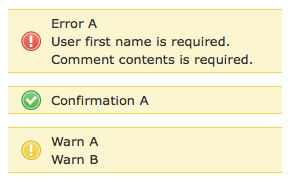
Which will by default leave you with this look:

Message Block Example

message_block on GitHub

05
Jul

Inverting Permission-Based Filtering with named_scope

The addition of named_scope in Rails 2.1 has revealed several elegant approaches for modeling complex problem domains in ActiveRecord.  One I came across recently while working on an app with a somewhat complex permissions system was a permission-based filtering mechanism.  In this case I was dealing with permission for a given user to manage an “office”, while a user could be at one of three permission “levels”, one of which has specific office assignments (or it’s assumed all are manageable if user.can_manage_all_offices is true). Lot’s of necessary conditional logic there.

Now a normal approach to such a task to “show a list of offices that the user can manage” (for a drop-down for an interface perhaps) might be something like this:

# In controller:
if current_user.can_manage_company?
  @offices = Office.find(:all)
elsif current_user.office_access_level? && current_user.can_manage_all_offices?
  @offices.find(:all)
elsif current_user.office_access_level?
  @offices.find(:all, :conditions => {:id => current_user.manageable_offices.map(&:id) })
else
  @offices = []
end

But this approach starts at the user level and, using a lot of conditional logic baked right into places we don’t want, makes different calls to Office, which isn’t very DRY, and certainly not consistent with fat models skinny controllers.  So I considered inverting this approach and instead starting with an office, and asking it what “is manageable by” a given user.  Consider this alternative:

# In office.rb
named_scope :manageable_by, lambda {|user|
  case
  when user.can_manage_company? then {}
  when user.office_access_level? && user.can_manage_all_offices? then {}
  when user.office_access_level? then {:conditions => {:id => user.manageable_offices.map(&:id)}}
  else {:conditions => "1 = 0"}
  end
}

# Then in controller:
@offices = Office.manageable_by(current_user)

This seems much more elegant to me.  I’m in general finding a lot of opportunities for inverting the way I designed something without named_scope to be more model-centric, so this approach helps further the design principle of “fat models, skinny controllers”. Sure you could do this before by defining your own methods and using with_scope, but named_scope just makes it all the more elegant.

Another advantage with using the named scope stuff is that you can chain scopes together. Let’s say that in another controller I want to do the same thing but instead restrict results to active offices only. I can create an “active” named scope that scopes :conditions => {:active => true}, then in the controller simply do this instead:

@offices = Office.manageable_by(current_user).active
28
Jun

Pleasing the JavaScript Download Time Whiners

To me, the benefit of using JavaScript frameworks in an application cannot be overstated.  Though I’m also a fan of server-side frameworks, there is scarcely a reason not to use a client-side framework these days.  Of course the most common complaint against JavaScript frameworks is “bloat” and the long download time.  Funny that the most vocal of those complaining about the frameworks’ download time are those who haven’t even ever used a framework to experience it’s benefits.  The tradeoff of course is a noticeable load hit for some users on slower connections vs. architectural elegance, much higher productivity, more maintainability, and less code in general.  To me in most cases the trade-off is a no-brainer in any sufficiently modern web application, but not to all.

Released recently is the Google Ajax Libraries API which is basically a way of allowing browsers do download only one version of a given framework for all applications using that framework.  Currently most web applications host their own version of a given JavaScript library, which is inefficient across the spectrum of the internet since many sites are using the exact same library.  With Google Ajax Libraries you essentially reference Google’s hosted version of the library and the download hit is only incurred the first time a user visits any site using that framework.  So it’s quite likely that a user going to your site won’t have to download a thing – it’s as if the framework is at that point simply part of the user’s browser.

Of course this only works if it becomes widely used and I sure hope it will.  I’d encourange all developers to start using this in their production environments (development environments should still use local copies for local development:

Google AJAX Libraries API
Rails Plugin for Google AJAX Libraries API

25
Jun

named_scope with acts_as_tree

I fairly often use the acts_as_tree plugin in my applications.  While acts_as_nested_set (and superior variants..) is more powerful, often times a simple two-level deep hierarchy is all I need and acts_as_tree is simple.  I’ve found the new named_scope functionality in Rails 2.1 to be very helpful when dealing with tree data structures.

Firstly, it’s somewhat rare that I have one single root node in the tree structure (which is apparently how it’s meant to be used).  Instead I’ll have multiple “parent” nodes designated with a NULL parent_id and children beneath.  In the past I’ve always done something like: find(:all, :conditions => {:parent_id => nil}) to grab the top entries.  Instead with nested set you can do this:

named_scope :top, :conditions => {:parent_id => nil}

#Then:
Category.top

Another common task when dealing with hierarchical categories is to query on the base object (products for example) for members that are “part of” that category. Specifically, part of in a 2-level heirarchy simply means “where id = ? or parent_id = ?” on the joined categories table. Because this involves a join it was somewhat clunky to do before. Now with nested set, on the product model I can declare this:

named_scope :in_category, lambda {|c| {:include => [:category], :conditions => ["categories.id = ? OR categories.parent_id = ?", c, c]} }

# Then:
Product.in_category(3)

I would also highly encourage you all to check out RailsCasts Episode 112 “Anonymous Scopes” by Ryan Bates where he outlines a pattern for handling conditions elegantly with searches using named_scopes in Rails 2.1, something I’ve always found to be lacking from Rails core and always resorted to using plugins like criteria_query.